

Roscopcoletrain
Well-known member
Yay lol
Sponsored

I also had a look today in the truck to make sure the settings were at KM and PSI on the Sync 4I have kms and psi as well setup in the fordpass app, however on the widget it still shows miles for range.

I looked in my code and it's definitely a bug. In the app's latest version, that information was moved into a SQLite database, but for migration purposes the old code accessing those values in shared preferences was left. The widget code is still reading from the shared preferences and not the database. Next release it will read from the correct place.I also had a look today in the truck to make sure the settings were at KM and PSI on the Sync 4


app now shows Kms and psiVersion 2022.05.25 just uploaded. This release fixes a significant bug with missing information in the databases after logging into the Ford servers which caused the app to quickly crash. I believe this mainly happens on new installs or when the app's data was cleared.
If you noticed no problems with 2022.05.20, you can upgrade as normal within the app or by sideloading. If 2022.05.20 doesn't work for you but did before, I'd recommend wiping the app's data before sideloading.
It should have been fixed in the last version, but it probably crashed before you could notice ??app now shows Kms and psi
Thank you sir


Same here - couldn't be any easier. Thanks!Phone got notification about the update and it updated itself. Awesome! Thanks!
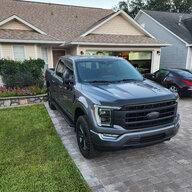



You've got your address on there, FYIThis is mine from my 2021 F150. What do you think?
As a reminder: under "Settings" you can disable the location. Useful when you want to screenshot but not doxx yourself.You've got your address on there, FYI

uhhh, the app notified me there was an update and I said yes, update. Is this now the bad version or a corrected version ?WARNING: an update was accidentally pushed out this morning to GItHub. DO NOT INSTALL. It's a non-working version.
If you do install, you will need to manually sideload the 2022.05.30 version just uploaded.


