turbopilot
Well-known member
- Joined
- Sep 8, 2021
- Threads
- 33
- Messages
- 743
- Reaction score
- 1,224
- Location
- Prescott, AZ
- Vehicles
- 2023 F150 Powerboost
- Thread starter
- #1
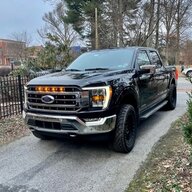
My 2021 PowerBoost with 7.2kw ProPower Onboard has a primary mission as a tow vehicle for a 25' Airstream Globetrotter trailer. Recently upgraded to Starlink In Motion High Performance phased array antenna and decided to put the antenna on the F-150 since ProPower Onboard is always available. Great performance with this setup using WiFi as WAN back to the Airstream. Be glad to post details of the custom install if anyone is interested.

More detail on the PowerBoost with Starlink In Motion phased array antenna.
In 2021 when I learned about the F-150 PowerBoost with 7.2kw ProPower Onboard it seemed like a perfect fit with a mid sized Airstream trailer. So I sold my Newmar Diesel Pusher and started what turned out to be a fascinating journey marrying the PowerBoost with an Airstream. After lots of calculations I decided a 25' Airstream Globetrotter was the best trailer for the PowerBoost. I ordered both in the Spring of 2021 and they booth arrived in the Fall of 2021. I quickly discovered the very heavy Platinum PowerBoost and 25' Airstream Globetrotter had some weight problems. The Airstream had a "heavy tongue" weight and the PowerBoost with every option only had 1,317 lb cargo capacity so something had to give.
The result was a total rebuild of the 2022 Airstream to remove around 200lbs of tongue weight by converting the trailer into an electric/diesel power trailer. All propane appliances were removed. That entire project is detailed and documented on the Airstream forum here. The Powerboost and the Airstream are connected in motion by an umbilical going to the Victron Inverter supporting four 100ah lithium batteries in the trailer.
I operated the PowerBoost and Airstream for a year with great results but the internet was never good with cellular modems. I decided to convert to Starlink just as the in motion antenna was released. Given that the PowerBoost had 7.2kw of power and Starlink can use up to 150 watts given my situation it made sense to mount the Starlink system on the F-150.
The first challenge is that there is a flaw in the high performance in motion Starlink connector. Starlink instructions say to mount the antenna connector forward into the wind on an 8 degree angle on the supplied aluminum mount. Early beta testers found out blowing a 70 mph breeze into that connection resulted in early corrosion. The solution is that I fabricated a custom mount laying flat on the sun roof with the connector well sealed and plugging in at the rear of the installation.
The custom mount uses 1" aluminum extrusion attached to four magnetic mounts. On the sun roof I used 3M VHB to adhere 4 thin sheet steel discs to the glass. So the magnetic mounts hold to the steel discs which in turn are held down by 3M VHB tape. The antenna only weighs 13 lbs. It is stable, secure and reasonably easy to remove.

The Starlink power supply is located in the bed of the F-150. I am not using the Starlink WiFi router. Instead I substituted a Peplink MAX BR1 Pro 5G mobile router. This router has WiFi 6 which is very important in crowded campgrounds. The enclosure has a pair of USB fans.


The trailer is equipped with a Peplink MAX Transit Duo Pro cellular router. This router collects the output of the Starlink system via WiFi as WAN, then combines it with Verizon cellular to make a Speedfusion Cloud VPN connection. Speedfusion fuses the two WAN sources (Starlink and Verizon) to provide a stable signal.
There are other reasons to put Starlink on the tow vehicle. At time obstructions at a camp sight will degrade Starlink performance. If that happens I just move the truck to a better location with ProPower keeping Starlink alive and WiFi back to the trailer. When not towing the trailer I have full speed unlimited internet coverage anywhere the F-150 happens to be. My F-150 Propower On Board backs up the house now with power and full speed internet. The Powerboost will start and run a few minutes every 15 to 30 minutes powering the Starlink system.
One device that went away with this setup was the Dish TV satellite system. With the Starlink setup and unlimited internet, YouTube TV makes much more sense as a source of typical satellite TV services.
Very happy with the setup. I am on the new Starlink Roam service which is slower than the residential service but this is highly variable depending on location. So far I am seeing download speeds between 25 and 150 down with the Starlink Roam service. As more satellites launch the service continues to improve.
More detail on the PowerBoost with Starlink In Motion phased array antenna.
In 2021 when I learned about the F-150 PowerBoost with 7.2kw ProPower Onboard it seemed like a perfect fit with a mid sized Airstream trailer. So I sold my Newmar Diesel Pusher and started what turned out to be a fascinating journey marrying the PowerBoost with an Airstream. After lots of calculations I decided a 25' Airstream Globetrotter was the best trailer for the PowerBoost. I ordered both in the Spring of 2021 and they booth arrived in the Fall of 2021. I quickly discovered the very heavy Platinum PowerBoost and 25' Airstream Globetrotter had some weight problems. The Airstream had a "heavy tongue" weight and the PowerBoost with every option only had 1,317 lb cargo capacity so something had to give.
The result was a total rebuild of the 2022 Airstream to remove around 200lbs of tongue weight by converting the trailer into an electric/diesel power trailer. All propane appliances were removed. That entire project is detailed and documented on the Airstream forum here. The Powerboost and the Airstream are connected in motion by an umbilical going to the Victron Inverter supporting four 100ah lithium batteries in the trailer.
I operated the PowerBoost and Airstream for a year with great results but the internet was never good with cellular modems. I decided to convert to Starlink just as the in motion antenna was released. Given that the PowerBoost had 7.2kw of power and Starlink can use up to 150 watts given my situation it made sense to mount the Starlink system on the F-150.
The first challenge is that there is a flaw in the high performance in motion Starlink connector. Starlink instructions say to mount the antenna connector forward into the wind on an 8 degree angle on the supplied aluminum mount. Early beta testers found out blowing a 70 mph breeze into that connection resulted in early corrosion. The solution is that I fabricated a custom mount laying flat on the sun roof with the connector well sealed and plugging in at the rear of the installation.
The custom mount uses 1" aluminum extrusion attached to four magnetic mounts. On the sun roof I used 3M VHB to adhere 4 thin sheet steel discs to the glass. So the magnetic mounts hold to the steel discs which in turn are held down by 3M VHB tape. The antenna only weighs 13 lbs. It is stable, secure and reasonably easy to remove.
The Starlink power supply is located in the bed of the F-150. I am not using the Starlink WiFi router. Instead I substituted a Peplink MAX BR1 Pro 5G mobile router. This router has WiFi 6 which is very important in crowded campgrounds. The enclosure has a pair of USB fans.
The trailer is equipped with a Peplink MAX Transit Duo Pro cellular router. This router collects the output of the Starlink system via WiFi as WAN, then combines it with Verizon cellular to make a Speedfusion Cloud VPN connection. Speedfusion fuses the two WAN sources (Starlink and Verizon) to provide a stable signal.
There are other reasons to put Starlink on the tow vehicle. At time obstructions at a camp sight will degrade Starlink performance. If that happens I just move the truck to a better location with ProPower keeping Starlink alive and WiFi back to the trailer. When not towing the trailer I have full speed unlimited internet coverage anywhere the F-150 happens to be. My F-150 Propower On Board backs up the house now with power and full speed internet. The Powerboost will start and run a few minutes every 15 to 30 minutes powering the Starlink system.
One device that went away with this setup was the Dish TV satellite system. With the Starlink setup and unlimited internet, YouTube TV makes much more sense as a source of typical satellite TV services.
Very happy with the setup. I am on the new Starlink Roam service which is slower than the residential service but this is highly variable depending on location. So far I am seeing download speeds between 25 and 150 down with the Starlink Roam service. As more satellites launch the service continues to improve.
Sponsored
Last edited: